This is default featured post 1 title

Go to Blogger edit html and find these sentences.Now replace these sentences with your own descriptions.This theme is Bloggerized by Lasantha Bandara - Premiumbloggertemplates.com.

This is default featured post 2 title

Go to Blogger edit html and find these sentences.Now replace these sentences with your own descriptions.This theme is Bloggerized by Lasantha Bandara - Premiumbloggertemplates.com.

This is default featured post 3 title

Go to Blogger edit html and find these sentences.Now replace these sentences with your own descriptions.This theme is Bloggerized by Lasantha Bandara - Premiumbloggertemplates.com.

This is default featured post 4 title

Go to Blogger edit html and find these sentences.Now replace these sentences with your own descriptions.This theme is Bloggerized by Lasantha Bandara - Premiumbloggertemplates.com.

This is default featured post 5 title

Go to Blogger edit html and find these sentences.Now replace these sentences with your own descriptions.This theme is Bloggerized by Lasantha Bandara - Premiumbloggertemplates.com.

Selasa, 27 Maret 2012

What is Axiata Cup?

The Axiata Cup is a new regional badminton event created for the Axiata Group – one of Asia’s largest telecom companies. The Championship has been produced to provide Axiata with a marketing platform to integrate its digital advertising sales and create an emotional link with badminton fans in the region. Featuring top South-East Asian teams, US$1 Million prize money and over twenty hours of live television, the Axiata Cup is poised to become a new exciting annual event in the world badminton calendar. Total Sports Asia (TSA) is fully involved in Axiata’s sponsorship activation strategy as well as all the operational aspects of the event.

The Axiata Cup will include Men’s teams from the following nations: Indonesia, Malaysia, Singapore, Thailand, Vietnam and the Philippines. The championship is sanctioned by the Badminton Asian Confederation (BAC) and the Badminton World Federation (BWF), and organized by Total Sports Asia (TSA). The Axiata Cup will capitalize on the popularity of National Team competitions such as the Thomas Cup and the Sudirman Cup and will use a three-match format including two singles and one doubles match per tie which gives more teams an opportunity to win). Each team consists of six players as the coach may elect to replace singles/doubles players from day to day (back-up players). Teams may also field up to two foreign players each—this means that even lower ranked teams can recruit the world’s top talent to boost their chances against the top teams! The format of the Axiata Cup will be reviewed each year and over time, this event could become the ASEAN Badminton League and feature more teams and a longer schedule.

There will be two venues in Malaysia and Indonesia for the group match qualifiers with four teams in each group. After the Group Stage, the two top teams then play cross over home and away games in the semi-finals on separate weekend. The Finals will be held in the same home and away format as the Semi-finals on a separate weekend.

The event will be widely covered by international media (TV, print, outdoor radio and internet). Additionally, there will be daily television broadcasts in the host countries; a total of 25 hours per event will be made available within the host nations and internationally. The event will be broadcast in Malaysia, Indonesia, Singapore, Thailand and other countries as we expect Badminton fans from all over Southeast Asia will want to catch up on all the action.

source: http://www.axiatacup.com/index.php/about-axiata-cup

Sabtu, 19 November 2011

Setting column width and row height in excel 2007 at centimeter (cm) or inci

Setting column width and row height In Excel 2007 at centimeter (cm) or inch

Default width 1 column in excel is 8,43. Unit for default column width is character (we don’t know more what is the meaning of character, but for while we can deem that 1 number is 1). So, default of 1 column width is 8,43 characters, so that in 1 column only include typed 8,43 characters, or we can say that 1 excel column only include 8 characters and for 9th character is not include completely in the column, please try to type 8 number characters, when we type 8 number characters still include in 1 column, and when we type 9th character is not include more. Like that approximately size for 8,43 characters.


As while for excel row height by default is 15. Unit for excel row height by default is point (pt). 1 pt approximately is 0,03533 cm.
Ok, Now how to change column width and row height at centimeter (cm) or inch? The manner is below:

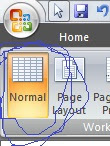
  1. Click on View tab


  2. Click on Page Layout

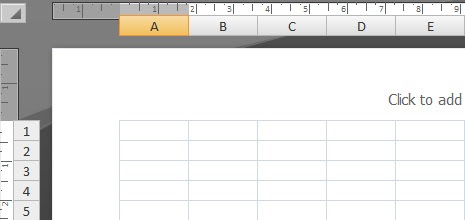
    and display of work sheet will change like below:
  3. Then, please change column width and row heigth as usually before, for this time column width unit and row height unit at centimeter (cm) or inch. For measurement at centimeter (cm), add “cm” after value entered and for measurement at inch, add “in” after value entered.
  4. And then, to back to before display, click on View tab (look at number 1), and click on Normal

Like that how to change column width and row height at centimeter (cm0 or inch, hope useful, if any doubt please send your question to sahabathypheninformasi@gmail.com, bye ^_^

Jumat, 29 April 2011

Make addition, substraction, multiplication and division Delphi program

To make addition, substraction, multiplication and division Delphi program is not difficult, if we have will to do it. OK, we will start to examine. First, make worksheet form like this below:

Basically, default name of edit text on right side of First number caption is edit1, erdit text on right side of Second number caption is edit2 and edit text on right side of Result is edit3. On this chance, we will change the name, we change edit1 with input1, edit2 with input2 and edit3 with output. Actually, no problem if we use default name without change them, however only to explain that edit1 is function as input1, edit2 is function as input2 and edit3 is function as output.

Now, we will start to write its syntax code. Depend on you, will which button start from between 4 button will be used. On this chance, we will just start from +(plus) button, then -(minus) button, then x(times) button and the last :(divided) button.

Don’t forget to save your file, at this chance we will save with name additon_and_multiplication, no problem with another name, only influence on syntax code or unit name, likely Delphi don’t allow the name with name which use space.

  1. Click on worksheet form, then double click on plus button, so that will show form code, and your cursor is between begin and end; and write there code below:
    a:=strtofloat(input1.text);
    b:=strtofloat(input2.text);
    c:=a+b;
    output.text:=floattostr(c);

    and formula for plus button have finished.
  2. Click again worksheet form, then double click on minus button, so that will show form code and your cursor still is between begin and end; and write there code below:
    a:=strtofloat(input1.text);
    b:=strtofloat(input2.text);
    c:=a-b;
    output.text:=floattostr(c);

  3. Click again worksheet form, then double click on times button, so that will show form code, and your cursor is between begin and end; and write there code below:
    a:=strtofloat(input1.text);
    b:=strtofloat(input2.text);
    c:=a*b;
    output.text:=floattostr(c);

  4. Click again worksheet form, then double click on divided button, so that will show form code, and your cursor is between begin and end; and write there code below:
    a:=strtofloat(input1.text);
    b:=strtofloat(input2.text);
    c:=a/b;
    output.text:=floattostr(c);

  5. Then, this time to declaration variables are used, are a, b and c variable. Move up your cursor until you find this code below:
    var
    Form1: TForm1;
    Implementation

  6. Then write code between Tform1; and Implementation.
    Ini kodenya:
    a,b,c:real;
  7. so that more complete code be like this:
    var
    Form1: TForm1;
    a,b,c:real;
    implementation

    Now try to click Run to run program and please test, like picture below:


That is sign of success to make a simple program with use Delphi, for friends is understandless, please ask to sahabat, if sahabat can, will help others
So, completely program syntax of this program is:

unit addition_and_multiplication;

interface

uses
Windows, Messages, SysUtils, Variants, Classes, Graphics, Controls, Forms,
Dialogs, StdCtrls;

type
TForm1 = class(TForm)
input1: TEdit;
Label1: TLabel;
Label2: TLabel;
Label3: TLabel;
input2: TEdit;
Label4: TLabel;
output: TEdit;
Label5: TLabel;
Button1: TButton;
Button2: TButton;
Button3: TButton;
Button4: TButton;
procedure Button1Click(Sender: TObject);
procedure Button2Click(Sender: TObject);
procedure Button3Click(Sender: TObject);
procedure Button4Click(Sender: TObject);
private
{ Private declarations }
public
{ Public declarations }
end;

var
Form1: TForm1;
a,b,c:real;
implementation

{$R *.dfm}

procedure TForm1.Button1Click(Sender: TObject);
begin
a:=strtofloat(input1.text);
b:=strtofloat(input2.text);
c:=a+b;
output.text:=floattostr(c);
end;

procedure TForm1.Button2Click(Sender: TObject);
begin
a:=strtofloat(input1.Text);
b:=strtofloat(input2.text);
c:=a-b;
output.Text:=floattostr(c);
end;

procedure TForm1.Button3Click(Sender: TObject);
begin
a:=strtofloat(input1.Text);
b:=strtofloat(input2.Text);
c:=a*b;
output.Text:=floattostr(c);
end;

procedure TForm1.Button4Click(Sender: TObject);
begin
a:=strtofloat(input1.text);
b:=strtofloat(input2.text);
c:=a/b;
output.text:=floattostr(c);
end;

end.


For friends who want to see example of application program is created by syntax above on Delphi can download it here and who want to download microsoft word file (.doc file) can download it here


All of truth come from God and faults are from me

Senin, 21 Maret 2011

Create a Windows 7 System Repair Disc

this posting is 100 % plagiarism from sevenforums.com, exactly is http://www.sevenforums.com/tutorials/2083-system-repair-disc-create.html, then why I did this? just for my note, so that I'm not difficult to search again in google.com. Thank you sevenforums.com, your article is useful for many people in the world, like me in Indonesia.

How to Create a Windows 7 System Repair Disc?


Information:
This will show you how to create a Windows 7 System Repair Disc to use to boot to the system recovery option if you don’t have a Windows installation disc, can’t find your Windows installation disc or can’t access the recovery options provided by your computer manufacturer.

EXAMPLE: System Recovery Options screen
NOTE: Using the System Repair Disc that you have created below, you can boot to the system recovery options screen below.


OPTION ONE

To Manually Create a "System Repair Disc" in Windows 7


NOTE: If you have a OEM Windows 7 instead of a retail Windows 7, then you may need to use OPTION TWO below to create a System Repair Disc with instead.
  1. Open Start Menu
    1. In the search line, type recdisc.exe and press Enter. (See screenshot below)
    2. Go to step 3.
    OR

  2. Open the Control Panel (All Items View), and click on the Backup and Restore icon
    1. Click on the Create a System recovery disc in the left blue pane. (See screenshot below)

  3. Insert a blank CD or DVD into your CD/DVD drive and click on the Create disc button. (See screenshot below)
  4. NOTE: If you are prompted to insert a Windows installation disc, it means that the files needed to create the system repair disc cannot be found on your computer. Insert a Windows 7 installation disc.


  5. It will now start creating the System Repair Disc. (See screenshot below)
  6. NOTE: If a AutoPlay window pops up, just close it.


  7. When it's finished, click on the Close button. (See screenshot below)


  8. Click on OK. (See screenshot below)


  9. Remove and label your new Windows 7 System Repair Disc from the CD/DVD drive.

OPTION TWO

To Create a "System Repair Disc" with a Download

NOTE: This option is perfect if you do not have a retail Windows 7 installation DVD and only have a OEM Windows 7 recovery DVD or partition.
  1. Click on the link below to download the same 32 bit (x86) or 64 bit ISO file as the 32-bit or 64-bit Windows 7 version you have installed.
    NOTE: This will be a torrent download. Be sure to read the instructions on how to download and use the torrent file at the site below.

  2. Follow the instructions at the site above to burn the ISO to a DVD disc.
    OR

  3. You can use the Windows 7 USB/DVD Download Tool to burn the ISO to a USB flash drive.

  4. You now have a Windows 7 System Repair Disc on a DVD or USB flash drive.

That's it,
Shawn

Sabtu, 03 April 2010

Examination a number prime or not

Algorithm and examination program a number, is the number including a prime number or not

Look Aminah together Amin
Say Bismillah before begin


Hhhmm, we know that a prime number is a number which is not residual zero if devided by numbers instead 1 and it self, for example like this:
  • 7 is a prime number, because 7 only residual zero if devided by numbers 1 and it self
  • 11 is a prime number, because 11 only residual zero if devided by numbers 1 and it self
  • 8 is not prime number, because instead devided by numbers 1 and 8 self, 8 also residual zero if devided by number 2 and 4
  • 15 is not prime number, because instead devided by numbers 1 and 15 self, 15 also residual zero if devided by 3 and 5

Wah, this is just basic theory about what is definition of prime number, understand? understand ya.........? fortunately, if understand we will continue

For example a is number will be examined, is prime number or not, then:
  • a is a prime number if and only if a is not residual zero if devided by numbers instead 1 and a self,
  • Statement above can be written as follow: a is a prime number if and only if a is not residual zero if devided by numbers 2, 3, ..., a-1
  • If we suppose that b = 2, 3, ..., a, then its mean a is a prime number if and only if a mod b = 0 (we continue again yach......)


Before make program, first we will make the algorithm, number will be entered certain fulfill one of three conditions below:
  1. The number will be entered smaller than 2 (a < 2)
  2. The number will be entered is 2 (a = 2)
  3. The number will be entered larger than 2 (a > 2)

For number which smaller than 2, has certain is not prime number, because the prime number started form 2, and for number which larger than 2, then need to next examination, is the number prime number or not, so be obtained algorithm as follow:


If the algorithm above we write in Turbo Pascal Programming Language, then will be obtained syntax as follow, the syntax like what ya? like code below...

uses crt;
var a,b: longint;
begin clrscr;
writeln('PRIME NUMBER EXAMINATION PROGRAM');writeln(#10);
writeln('This program will ask input a number to know is the number prime number or not');
writeln(#10); write('input a number: '); readln(a);
if a<2 then writeln(a,' has certain is not prime number, because prime number started from 2');
if a=2 then writeln(a,' is a prime number');
for b:=2 to a-1 do
if a mod b = 0 then
begin
writeln(#10); writeln(a,' is a prime number');
b:=a-1;
end else
begin
if b=a-1 then
begin
writeln(#10); writeln(a,' is not prime number');
end;
end;
readln end.
huh the finally finish,

For friend who want the pascal file or .pas extension file can download it here, so that don’t need to rewrite in Turbo Pascal program, hehe, ^_^

Result from examination a number pascal programming, prime or not is a application or .exe file which can be downloaded here

The .doc file of this post can be downloaded here
accept my creation, thank you

Selasa, 18 Agustus 2009

Bismillahirrahmanirrahim

Assalamu 'alaikum Warahmatullah Wabarakatuh,


A glance about me, I am a man of Indonesian nationality have felt education at Academic Institution since 2005 (also year when I graduate from Senior High School). So, until this time I still have status as student university at one of State Academic Institution in Indonesia .


How many familiar with world of internet?

When I just graduate from Senior High School, my knowledge is able said 0 % (zero percent) about internet , just try to imagine, when I follow exam to entry STAN (Sekolah TInggi Akuntansi Negara/An State Institution about taxation are expensed by government), to know the result from internet, cause I don’t know to browse internet, then I just ask to internet operator directly to see STAN site which I wrote at leaf of paper at that time.


And I began to be a student university, I don’t still familiar with internet yet, moreover what did just say with email, I didn’t know at that time yet. So different with condition at recently, children who still active at Elementary School that their age just 1 number digit have been said to familiar with internet (may be along with expand of technology), but all is not required to regretted why when I still active in Elementary School internet seldom know and hard to get place to browse internet, cause I gave enjoyment born to world previously (see the greatness of Allah ) than the Elementary School children, although, when I in Elementary School previously, the world are not sophisticated yet like found by the Elementary School children now.


Why is interesting to make a blog??

  1. Its can save many kinds of article with unlimited capacity via publications, however save article without write it in blog also be able to do with upload the article in file form in order to download when be needed. But, 2 method above which use internet media always guaranteed than save file in computer which limited capacity and risk to be attached computer virus which able to destroy file, moreover make disappear file.
  2. Have plan to help many people via internet world with publish benefit publications, and mutual sharing knowledge with blog visitor and with blogger fellow friend.
  3. Its can increase friend and make friendship relation, cause we were born to mutual know one to others, if don’t believe try to see in Al Qur-an, Al Hujurat chapter, 13th part, hhmmm isn’t right......??
  4. Want to learn information technology. Today don’t know with blog yet?? (What world say??)


All right, perhaps it as introduction from me via my first publication. Finally, with say Bismillahirrahmanirrahim, today August 16, 2009, I publish my first publication in my blog , may it happen next publication can benefit for my self and for all friends certainly.


One my message:

Use internet just to make goodness and piety and don’t use internet to make sin and infraction!!!

All right things come from Allah, and its wrongs are my faults. Please forgive me and I also ask to suggestion and healthy criticism from all friends.


Wassalam

Fraternity Greeting


Sahabat informasi